
S/MIME Encryption for Microsoft 365: Protect Email Inside the Mailbox

S/MIME encryption for Microsoft 365: protect email inside the mailbox
How can organisations protect sensitive email content inside Microsoft 365 and Exchange Online while maintaining centralised security controls?
Traditional secure email gateways protect messages exchanged with external parties. However, after an incoming email has been decrypted and inspected by the gateway, its content may be delivered to the employee's mailbox in a form that the email service can process.
For organisations using Microsoft 365, this raises an important question: Who can technically access the content of an email once it reaches Exchange Online?
Microsoft provides extensive security controls, service encryption and administrative access protections. However, these are different from S/MIME content encryption using private keys controlled by the organisation.
CipherMail Internal Encryption addresses this distinction by extending S/MIME protection from the secure email gateway into the employee's mailbox.
Developed jointly by CipherMail and ID Security, the approach combines gateway-based security inspection with S/MIME encryption, centralised certificate management through CEMA and certificate deployment through Microsoft Intune or Active Directory.
The capability is currently described as being in testing, with release planned for late 2026.
Why traditional email gateway encryption leaves a gap in Microsoft 365
A secure email gateway protects communication between an organisation and external correspondents.
It can decrypt incoming messages, scan attachments, apply security policies and inspect content before delivering messages to internal users.
However, once an incoming message has been processed, it may be delivered to Exchange Online without an additional layer of user-level S/MIME content encryption.
This means the message content is accessible to systems and services authorised to process mailbox data.
Microsoft 365 Customer Lockbox vs Cryptographic Protection
Customer Lockbox provides an approval process for certain Microsoft support requests involving access to customer content. These approvals are controlled and time-limited (Microsoft)
However, administrative approval mechanisms are not the same as cryptographic restrictions on access to message content.
Customer Lockbox also does not provide a universal protection mechanism against every form of third-party or government data request.
This distinction is particularly relevant for organisations with strict confidentiality, data sovereignty or regulatory requirements.
The objective of internal S/MIME encryption is not to replace Microsoft 365 security controls, but to add a separate layer of content protection inside the mailbox.
How CipherMail internal encryption Works
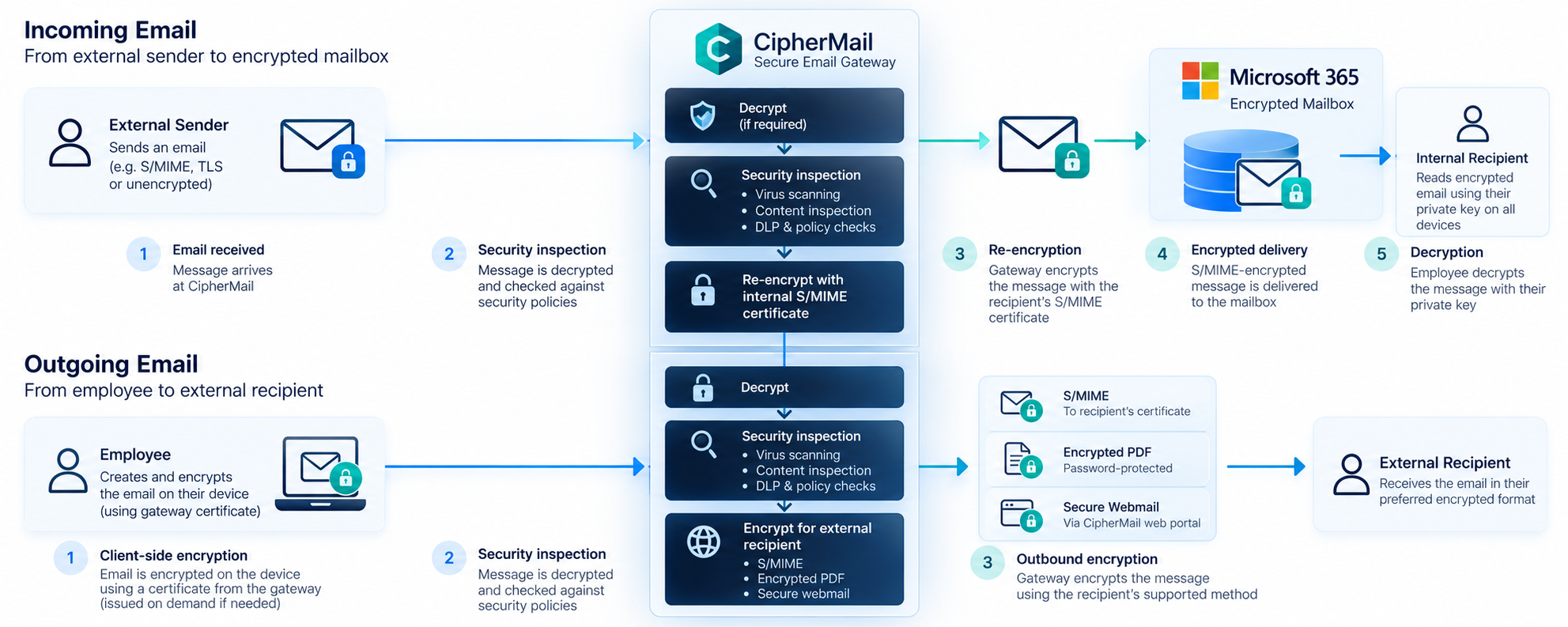
CipherMail Internal Encryption introduces a re-encryption process between the external communication channel and the internal mailbox.
The gateway remains responsible for security inspection and policy enforcement, while S/MIME protects the message after it has been processed.
Incoming email: From the external sender to the encrypted mailbox
When an external sender sends an encrypted email to an employee, the proposed workflow operates as follows:
- The CipherMail Secure Email Gateway receives the message.
- The gateway decrypts the incoming content where required.
- Antivirus scanning, content inspection and security policies are applied.
- The gateway retrieves the internal recipient's S/MIME encryption certificate.
- The message is re-encrypted using the recipient's public key.
- The encrypted message is delivered to the employee's Microsoft 365 mailbox.
- The employee decrypts the message using the corresponding private key.
The result is that email content remains S/MIME-encrypted when stored in the mailbox.
Outgoing email: From the employee to an external recipient
For outgoing communication, the process works in reverse.
The employee's email client encrypts the message on the device using a certificate associated with the gateway.
The gateway holds the corresponding private key, allowing it to decrypt the message, perform security checks and apply the organisation's outbound policies.
The gateway can then protect the message using a method supported by the external recipient, including:
- S/MIME encryption using the recipient's certificate
- Encrypted PDF delivery
- Secure webmail delivery
The sender's own signing identity remains relevant for digital signatures, allowing recipients to verify the sender's identity and message integrity.
How are gateway encryption certificates discovered?
Before encrypting an outgoing message, the client needs a certificate for the external recipient address.
In the proposed design, the client queries the certificate directory associated with the gateway.
If a suitable certificate does not yet exist, the gateway can issue one dynamically and return it to the client.
This enables the client to encrypt the message before it leaves the device, while allowing the gateway to process it according to the organisation's security policies.
Is CipherMail Internal Encryption end-to-end encryption?
No. CipherMail Internal Encryption is not end-to-end encryption in the strict cryptographic sense.
The gateway deliberately decrypts messages to perform security inspection, malware scanning, content checks and Data Loss Prevention (DLP).
This is a fundamental architectural distinction.
The goal is to protect email content inside the mailbox without removing the organisation's ability to enforce security policies at the gateway.
What happens to email between internal users?
Messages exchanged directly between internal users do not necessarily pass through the CipherMail gateway.
In the architecture described here, internal client-to-client communication bypasses the gateway.
Consequently, central gateway inspection and policy enforcement do not apply to those messages.
Organisations must account for this limitation when designing their internal email security policies.
Why S/MIME encryption requires the same private key across devices
One of the most important challenges in enterprise S/MIME deployment is private-key management.
An employee may read email using Outlook on a laptop, Outlook Mobile on a smartphone and a browser-based email client.
To decrypt the same encrypted message across these environments, each supported client needs access to the corresponding private encryption key.
Why traditional device-specific certificate enrolment is insufficient
Standard certificate enrolment approaches frequently issue separate certificates and private keys for individual devices.
This is appropriate for many authentication scenarios, but creates problems for S/MIME email encryption.
If every device receives a different encryption identity, an email encrypted for one certificate may not be readable on another device.
This can result in inconsistent access to encrypted messages across an employee's devices.
For the architecture described here, the solution is to distribute the same user encryption identity to the devices that need to read the mailbox.
Encryption certificates vs signing certificates
Encryption and digital signing serve different security purposes and therefore require different key-management policies.
Why encryption key escrow matters
An encrypted email remains dependent on the private key required to decrypt it.
If that private key is lost, previously encrypted messages may become permanently inaccessible.
This is particularly important when:
- Employees replace their devices.
- Certificates expire or are replaced.
- Users access email across several devices.
- Organisations need to recover historical encrypted messages.
- Employees leave the organisation.
Expired encryption certificates and their corresponding private keys may still be needed to read historical messages.
A replacement certificate does not automatically decrypt messages encrypted with an earlier key.
For this reason, the proposed architecture uses centralised escrow for encryption keys.
Signing keys are treated differently because their security value depends on their attribution to the individual signer.
Deploying S/MIME certificates with Microsoft intune and CEMA
In Microsoft 365 environments, the proposed architecture combines CEMA Certificate Lifecycle Management, Microsoft Intune and CipherMail.
Each component has a defined responsibility.
How CEMA distributes S/MIME certificates through Intune
CEMA manages the encryption certificate lifecycle and the centrally controlled encryption keys.
The workflow described in the original architecture is:
- CEMA generates the encryption key pair centrally.
- The configured Certificate Authority (CA) issues the S/MIME certificate.
- CEMA securely escrows the encryption key.
- The certificate and private key are packaged in PKCS#12 format.
- CEMA transfers the certificate package through Microsoft Graph for Intune deployment.
- Intune distributes the encryption identity to the user's managed devices.
The supported target platforms described in the design are Windows, macOS, iOS and Android.
The Certificate Connector for Microsoft Intune, installed on Windows Server, is a prerequisite.
The password protecting the private-key package is encrypted before upload. Administrators should verify the precise handling of the certificate package, its encryption and key access against the current Microsoft deployment documentation and the final CEMA implementation.
Microsoft provides additional details in its Imported PKCS Certificates documentation.

Certificate deployment without Intune
For organisations using Active Directory-joined Windows clients, the proposed architecture also supports certificate enrolment without Intune.
Clients can use Windows auto-enrolment through Certificate Hub.
The encryption key still requires a recoverable escrowed copy so that historical encrypted email remains accessible when devices are replaced.
What does each component do?
CipherMail Secure Email Gateway
Handles message encryption and decryption, external correspondent certificates, content inspection and gateway security policies.
CEMA Certificate Lifecycle Management
Manages certificate issuance, encryption-key escrow and publication of internal S/MIME certificates.
Certificate Hub
Provides certificate enrolment interfaces for Microsoft Intune and Active Directory environments.
How Outlook clients discover S/MIME certificates
S/MIME encryption requires the sender's email client to locate an appropriate recipient certificate.
However, certificate discovery differs across email applications.
Outlook Desktop, Outlook on the web, Outlook Mobile and Apple Mail do not all use the same lookup mechanisms.
Microsoft documents the requirements for mobile S/MIME configuration in S/MIME for Outlook for iOS and Android.
Outlook Desktop
Outlook Desktop can use certificates provisioned through supported enrolment methods and retrieve recipient certificates through directory services such as LDAP and the Global Address List.
Outlook on the web
The proposed deployment relies on certificate availability and publication through the organisation's directory infrastructure.
The exact S/MIME support and private-key availability requirements must be verified for the selected browser and Outlook configuration.
Outlook Mobile
In the described configuration, Outlook Mobile checks for recipient certificates in the local certificate store, Microsoft Entra ID and a configured LDAP endpoint.
The LDAP endpoint is supplied through an application configuration policy.
The proposed endpoint does not require authentication, which creates additional access-control considerations.
Apple Mail on iOS
Apple Mail can use S/MIME identities provisioned through device-management profiles and discover recipient certificates through configured directory and contact sources.
Certificate publication and revocation requirements
Because different email clients use different certificate discovery mechanisms, the proposed architecture publishes certificates through:
- The certificate directory associated with the gateway.
- The
userCertificateattribute in the directory service used to populate the Global Address List.
Trusted root certificates must also be distributed to the devices.
For Intune-managed devices, this can be achieved using trusted certificate profiles.
Certificate revocation information must remain accessible to clients. Outlook Mobile, for example, may require successful revocation checking before accepting a certificate retrieved through LDAP.
These requirements must be tested for every supported client and device platform.
S/MIME encryption, email archiving and ediscovery
Encrypting email content inside the mailbox introduces important operational trade-offs.
Once a message is protected using user-level S/MIME encryption, services without access to the corresponding decryption key cannot inspect its plaintext content.
This affects several Microsoft 365 and enterprise email workflows.
Mailbox search
Traditional full-text indexing may no longer be able to search encrypted message bodies or attachments.
Users may therefore lose some search functionality for protected messages.
Email archiving and journaling
Archives and journaling systems may receive encrypted copies of messages.
To recover and search historical content, organisations need an appropriate key-recovery or controlled decryption strategy.
Microsoft Purview eDiscovery
Encrypted email can create limitations for discovery and investigation workflows.
The actual impact depends on the encryption implementation, supported Microsoft 365 capabilities and available key-access mechanisms.
Organisations should validate eDiscovery requirements before enabling internal mailbox encryption.
Antivirus scanning and DLP
Security tools operating inside the mailbox may no longer be able to inspect encrypted message content.
In the CipherMail architecture, the gateway remains responsible for performing these checks before messages are encrypted for internal delivery.
This preserves an important layer of centralised inspection, but does not restore plaintext visibility to downstream mailbox services.
Security Considerations Before Deploying Internal Email Encryption
Internal S/MIME encryption introduces additional cryptographic protection, but it also increases the importance of certificate lifecycle management and endpoint security.
Protecting the certificate directory
The proposed architecture includes an LDAP endpoint used by mobile clients for certificate discovery.
Because the endpoint may be unauthenticated and can issue certificates dynamically, administrators must control network access and request rates.
The service should be protected against unnecessary exposure and automated abuse.
Managing private keys securely
Encryption-key escrow is essential for message recovery, but it also creates a sensitive central security component.
Organisations must define who can access escrowed keys, how access is authorised and audited, and how keys are protected throughout their lifecycle.
Internal communication policies
Messages exchanged directly between internal users may bypass the gateway.
Organisations must determine whether additional endpoint or Microsoft 365 controls are required for these communications.
Certificate lifecycle and renewal
Replacing an encryption certificate must not make previously encrypted messages inaccessible.
Historical keys need to remain recoverable for as long as the organisation must retain and read the associated messages.
Internal S/MIME encryption deployment checklist
Before introducing internal encryption for Microsoft 365, organisations should answer several practical questions.
These questions help determine whether an organisation is ready for internal mailbox encryption and where additional technical preparation is required.
CipherMail and ID Security: Extending S/MIME protection into Microsoft 365
CipherMail and ID Security have jointly designed an internal encryption approach that combines secure email gateway processing with S/MIME protection inside Microsoft 365 mailboxes.
The architecture brings together:
- CipherMail for secure email processing, inspection and encryption.
- CEMA for certificate lifecycle management and encryption-key escrow.
- Certificate Hub for enrolment and certificate distribution.
- Microsoft Intune and Active Directory for managed device integration.
The objective is to help organisations maintain centralised email security controls while reducing plaintext exposure inside cloud-hosted mailboxes.
Availability: The solution is described in the original technical material as developed and undergoing testing, with release planned for the end of 2026. The release date and supported configurations remain subject to confirmation.
-
Frequently Asked Questions about S/MIME encryption for Microsoft 365
1. What is S/MIME encryption in Microsoft 365?
S/MIME (Secure/Multipurpose Internet Mail Extensions) is a standard for encrypting and digitally signing emails using public key certificates. In Microsoft 365 and Exchange Online, S/MIME can protect email content so that only users with the corresponding private decryption keys can read it.
2. Does Microsoft 365 provide end-to-end email encryption?
Microsoft 365 provides encryption and security controls, but not every email is protected by end-to-end encryption. S/MIME can provide additional message-level protection. The proposed CipherMail internal encryption architecture uses gateway-based inspection and re-encryption, so it is not strict end-to-end encryption, because the gateway can inspect message content.
3. How does CipherMail internal encryption work?
For incoming emails, CipherMail decrypts messages when necessary, performs virus scanning, content inspection and policy checks, and then re-encrypts them using the internal recipient's S/MIME certificate before delivery to Microsoft 365.
For outgoing emails, the employee encrypts the message on their device to a certificate associated with the gateway. CipherMail decrypts and inspects it before applying the encryption method supported by the external recipient, such as S/MIME, encrypted PDF or secure webmail.
4. Can S/MIME protect emails stored in Exchange Online mailboxes?
Yes. When messages are encrypted using the recipient's S/MIME certificate before reaching Exchange Online, their message content can remain encrypted inside the mailbox. The recipient needs the corresponding private key to decrypt the message.
This can provide an additional cryptographic layer of confidentiality beyond standard Microsoft 365 service-level encryption and access controls.
5. Why must the same S/MIME encryption key be available on multiple devices?
An encrypted email can only be decrypted using the corresponding private key. If employees access their mailbox from multiple devices, such as a laptop, smartphone or tablet, they need access to the appropriate encryption key on each device.
In the proposed CEMA architecture, encryption keys are centrally managed and securely distributed to authorised devices. This also supports access to historical encrypted messages.
6. How does Microsoft Intune deploy S/MIME certificates?
Microsoft Intune supports the deployment of imported PKCS certificates to managed devices.
In the proposed architecture, CEMA generates and manages the encryption key pair, issues the certificate through the configured certificate authority and prepares a protected PKCS#12 package for distribution through Microsoft Intune.
The solution uses Microsoft Graph and requires the Certificate Connector for Microsoft Intune. Supported target platforms in the proposed design include Windows, macOS, iOS and Android.
See Microsoft's documentation on imported PKCS certificates.
7. What is the difference between S/MIME encryption and signing certificates?
An encryption certificate is used to protect email confidentiality. In the proposed architecture, its private key is centrally escrowed so authorised users can decrypt messages across devices and recover historical emails.
A signing certificate is used to verify the sender's identity and message integrity. Signing keys are generated on individual devices and are not centrally escrowed in this design, helping preserve attribution to the signer.
8. How do Outlook clients discover S/MIME certificates?
Certificate discovery depends on the email client.
Outlook Desktop can use LDAP address books and the Global Address List. Outlook Mobile can check the local certificate store, Microsoft Entra ID and a configured LDAP endpoint. Web-based clients depend on their supported directory and certificate configuration.
Correct certificate publication, trusted root certificates and accessible revocation information are important for successful deployment.
See Microsoft's Outlook mobile S/MIME guidance.
9. Does internal S/MIME encryption affect email archiving, search and eDiscovery?
Yes. When email content is stored in encrypted form, systems that previously searched or inspected plaintext message content may no longer be able to access it directly.
This can affect mailbox full-text search, journaling, email archiving, eDiscovery and mailbox-level security scanning.
Organisations should evaluate these limitations before deployment and ensure their archiving and compliance processes have an appropriate way to access encrypted information when authorised.
10. Is CipherMail internal encryption available today?
The original technical article, dated October 2026, describes CipherMail internal encryption as a solution jointly designed by CipherMail and ID Security.
At that time, development had been completed and testing was underway, with a release planned for late 2026.
This is a planned release, not a confirmed general-availability announcement. Organisations should contact ID Security for the latest information about availability, compatibility and deployment requirements.
.png)

.png)